
The problem
I work across a bunch of code projects spread across my repo directory, each needing different editors, terminals, and tools. Opening a file manager and navigating around or keeping a mental map of where everything lives is tedious. I wanted a launcher that gets me into the right project in the right tool in a couple keystrokes.
What it does
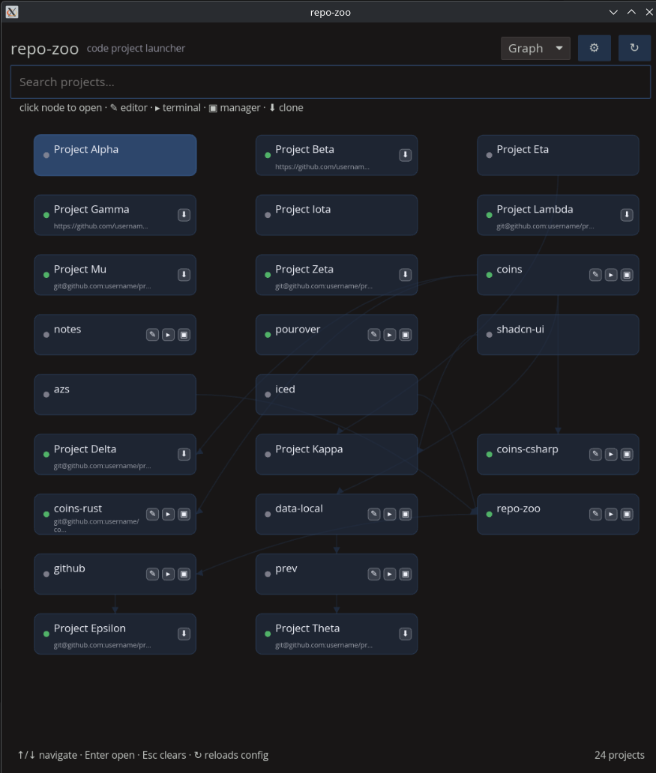
repo-zoo is a keyboard-driven desktop launcher for code projects. Press a global hotkey, type a project name, and open it in your editor, terminal, or file manager. It scans your code directories once, seeds a TOML config, and then the config is the source of truth.
Two views:
- List view — a flat, filterable list with per-project action buttons.
- Graph view — projects rendered as nodes in a dependency graph on an iced canvas. Edges represent
depends_onrelationships. Clickable, hoverable, with action icons per node.
The interesting bits
Most of the work went into platform-specific plumbing:
-
KDE Plasma hotkey — instead of a raw X11 grab (which doesn’t work under Wayland), repo-zoo installs a small KWin JavaScript plugin and bridges it back to the app over D-Bus. Shows up as a native KWin shortcut in System Settings and works under both X11 and Wayland.
-
Wayland/X11 fallback — on Wayland sessions with XWayland, the app unsets
WAYLAND_DISPLAYat startup so iced/winit uses X11 for video. This lets the compositor honor the requested window geometry (positioned above the taskbar), which native Wayland always ignores. -
Graph layout — Tarjan’s algorithm for strongly-connected components, longest-path layering for vertical positions, sub-row wrapping for wide layers. Dependency relationships sit at the top of the graph; unrelated nodes sink below.
-
Git-aware clone — projects with a configured remote but no local checkout appear as clone candidates. One click runs
git cloneand re-scans. -
Windows single-instance — a named mutex prevents multiple instances; a second launch toggles the existing window via
PostMessage.
Tech
Rust, iced for the GUI, TOML for config, tray-icon for the system tray, zbus for KDE D-Bus, x11rb for X11 hotkey grabs, windows-sys for Win32 APIs. Cross-compiled to Windows from Linux via mingw. Works great if you’re a cachyos/arch + KDE plasma user, kinda fine if you’re windows.
It’s on GitHub at jamessantiago/repo-zoo with pre-built binaries on the releases page.